SC 2012 Configuration Manager Servicing Extension beta available for download

This is a nifty new tool. Today on Microsoft Connect Configuration Manager Servicing Extension was released. It’s a useful extension for CM12 which adds a new node to the Administration workspace.
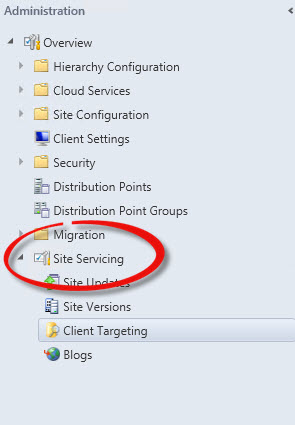
serviceingManager Node

Once you have installed the extension, the new Site Servicing node provides several useful features.

Read more of this post

Microsoft Deployment Toolkit 2012 and DaRT

One of the coolest new features in MDT 2012 is the ability to integrate  Diagnostics and Recovery Toolkit (DaRT) 7  into the Lite Touch boot images generated on your MDT Deployment share.  If you haven’t seen DaRT, it is part of the The Microsoft Desktop Optimization Pack (MDOP), a suite of technologies available as a subscription for Software Assurance customers. http://www.microsoft.com/en-us/windows/enterprise/products-and-technologies/mdop/default.aspx.

Read more of this post

Client Center for Configuration Manager Alpha is now available for SCCM 2012

if you have used Client Center for Configuration Manager 2007 you already know what a great utility it is. You can troubleshoot and explore client settings, logs, kick off policy updates and trigger most client agent activities from a remote system. This new Alpha version of the utility is designed for Configuration Manager 2012. No SCCM administrator should be without it.

You can download it from http://sccmclictr.codeplex.com/

Read the prerequisite before installing. You need WinRM and .Net Framework 4.

Microsoft Security Compliance Manager V2 beta now available on Microsoft Connect

A few weeks ago I told you about the great tool available from Microsoft called Security Configuration Manager. Recently Microsoft has made the beta version of the SCM V2 product available on their connect site. The tool is free, and provides some excellent features (see my previous post at https://dbgriffin.wordpress.com/2011/01/08/microsoft-security-compliance-manager-2/).  Read more of this post

Microsoft Security Compliance Manager

The Microsoft Solution Accelerators team has a great product – the “Microsoft Security Compliance Manager”. One of the problems many of us face is evaluating which systems do, and which do not comply with our corporate expectations. For instance, which systems have invalid firewall configurations, which systems do not have a valid antivirus product installed, or which systems have administrator accounts with non-expiring passwords. Performing compliance audits of workstations or servers has been a bit challenging and Security Compliance Manager (SCM) can help.

Read more of this post

ConfigMgr 2007 Toolkit version 2

I stumbled upon this today – missed the announcements. The System Center Configuration Manager team has released V2 of the ConfigMgr toolkit.

One significant tool that I notice has be re-released in this version of the toolkit is the Management Point Troubleshooter Tool. I used it today to evaluate my management point on my Server 2008 R2 Site Server to ensure it was correctly installed. The MP Troubleshooter tool will do a pre and post MP install check, and notify you of any problems it identifies. In this version of the troubleshooter, it can even detect WebDAV rules and if necessary can provide automated fixes.

You can download the toolkit here.

Nice new tool – Windows 7 USB DVD Download tool

Creating a bootable USB disk from which to install Windows has been an option which required a bit of “manual labour” to get it to work. Microsoft now provides a free downloadable tool called the “Windows 7 USB/DVD Download Tool”. You download and install the tool from Microsoft, obtain the Windows 7 or Windows Server 2008 ISO, and use the wizard to create your bootable USB disk. It’s incredibly simple.

http://store.microsoft.com/Help/ISO-Tool

Cool new ConfigMgr documentation tool

Microsoft Systems Managment MVP Kim Oppalfens has announced a cool new tool called SCCMAutoDoc. The tool provides rich documentation of relevant settings in your SCCM configuration. You can find his post, as well as links to download the beta at his blog.