Windows 10 Servicing – A New Way of Updating

Microsoft’s Configuration Manager product is used extensively to deploy and manage computer life cycle for Windows computers. With Windows 10 there are some significant considerations for existing ConfigMgr administrators. With or without Configuration Manager in your organization, you still need to plan for servicing so if you are not aware of these changes, please read on. This is just an overview, there’s a lot of detail I’ve left out in order to try to make this post simple and easy to follow. I’ve included some links at the end of the post to help you out if you need more detail.

Windows 10 Updating Changes

In Windows 10 Microsoft has introduced a new method for updating, upgrading and maintaining the operating system. This new process will be very new and possibly challenging for organizations currently running Windows 7.

Until recently, major feature enhancements to the Windows OS would be released with every new version of Windows, so from Windows 7 to Windows 8 we saw some significant change to the feature set of the operating system. Of course new Windows versions were released about every 3 to 5 years. With Windows 10 release, and moving forward, Microsoft has committed to an entirely different release cycle. Read more of this post
Deploying Office 365 Click-to-Run as a Configuration Manager 2012 Application

If you haven’t already, you will likely soon face the task of rolling out Office 365 Click-to-Run. Microsoft’s subscription based Office suite is gaining traction. As with all your other applications, you will probably want to use Configuration Manager to do so. Office 365 changes the way we deploy applications, and it may take a bit of digging to figure out how we manage the Office 365 product using Configuration Manager.

Essentially there are two methods of deploying Office 365 ProPlus:

  1. Install Office 365 ProPlus directly from the Office 365 portal. Installing on demand from the portal may work for only a few users, but does not scale well.
  2. Download Office 365 ProPlus, create a local deployment source, and then deploy it to your users.

This second option is the one we will review in this post.

Read more of this post

SC 2012 Configuration Manager Servicing Extension beta available for download

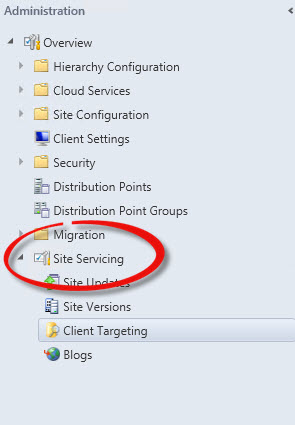
This is a nifty new tool. Today on Microsoft Connect Configuration Manager Servicing Extension was released. It’s a useful extension for CM12 which adds a new node to the Administration workspace.

serviceingManager Node

Once you have installed the extension, the new Site Servicing node provides several useful features.

Read more of this post

Configuration Manager Compliance Settings – Turning Off Auto-Remediation

I’m often asked by both students and consulting clients about Configuration Baselines and Items in Configuration Manager 2012. These existed in Configuration Manager 2007 under the name Desired Configuration Management. Compliance Settings in 2012, which include Configuration Items and Baselines, is great feature and I find often under-appreciated.

The Client Agent in Configuration Manager 2012 includes a great new feature that performs a check to ensure that critical client components and prerequisites are installed and functioning. The reason this is nice should be obvious to any ConfigMgr administrators who have ever had to deal with a client computer with a corrupted WMI database. The client health task, which you will actually find as a scheduled task on Configuration Manager 2012 client computers, runs regularly, will identify and in many cases automatically repair a failed client, Prior to this feature, ConfigMgr administrators spent a lot of time searching for and manually repairing these failed clients.

There are times however when auto-remediation of the Configuration Manager client is not desirable. For instance on a Server. You may not want the CCMEval task to automatically make changes to Windows Management Instrumentation on a server as it might affect other services being hosted on that server. Fortunately it’s a relatively simple fix if you want to disable this auto-remediation. It’s also a great example of Compliance Settings in action.

Read more of this post

Configuration Manager 2012 Windows Update Process

I’ve been offline for a while, working with clients on several Configuration Manager 2012 migrations. In the meantime, I came across a great article on the ConfigMgr Dogs blog. They lay out the Configuration Manager 2012 Software Update client-side process pretty much from beginning to end, including log files. Very useful if you are troubleshooting Software Updating.

http://blogs.technet.com/b/configmgrdogs/archive/2014/06/30/configmgr-2012-windows-update-client-process.aspx for the complete article.

Getting the most out of Mobile Device Management with Configuration Manager 2012 SP1 and Intune

I don’t very often see people doing a good job of describing the integration of Configuration Manager and Intune. If you are interested in how Configuration Manager and Intune will help you managing your iOS, Android and Windows phone devices, check out these 5 articles http://www.nomizo.fr/2013/03/sccm-2012-intune-mobile-management-part.html. Great posts!

System Center 2012 Configuration Manager SP1 CU2 now available

Just a quick note, I notice that CU2 is available for download. Check it out and see if it addresses any issues you have been encountering. http://support.microsoft.com/kb/2854009

WDS PXE-E32: TFTP open timeout

Ever get this message when PXE booting? I did again today. The PXE Server was running Windows Server 2008 R2 SP1, and PXE boot had been working perfectly until I applied some updates to the server last week. Following the server update, clients were unable to PXE boot, and the above error was displayed.

The fix? In my case I stumbled upon it in an online forum. Read more of this post

Configuration Manager 2012 with SP 1 Native PowerShell support

I’m no PowerShell ninja. But like most Configuration Manager administrators, the writing is on the wall. With PowerShell now natively supported in SP1, it’s time to become comfortable with it.

On the Configuration Manager Team’s blog they are just kicking off a weekly post on PowerShell integration in Configuration Manager. If you are a seasoned PowerShell guru, you will probably not be interested in their first post – it assumes you have no experience with PowerShell and covers the very basics. But I think this could be a blog to watch in the coming weeks if you want to get more in-depth knowledge of PS and CM integration. You’ll find the blog at http://blogs.technet.com/b/configmgrteam/archive/2013/03/13/powershell-basics.aspx.

Why would you want to use PowerShell in ConfigMgr? Well, I came across an excellent post from Peter Daalmans a couple of weeks ago which included a short little script that will delete objects from Configuration Manager when they are deleted in Active Directory. Clean up your ConfigMgr database without having to wait for objects to age out. Brilliant example of the power of PowerShell cmdlets!

Configuration Manager 2012 failed to start DP health monitoring task . . .

I ran into a strange Configuration Manager 2012 issue today on a client site. The “Configuration Manager Client” package for some reason was failing to be processed by Distribution Manager. The status of the Distribution Manager component was critical, and the distmgr.log file was repeatedly displaying the following errors;

~Failed to start DP health monitoring task for package ‘xxx00003’. Error code: -1
. . . and

~Failed to process package xxx00003 after 35 retries, will retry 65 more times

All of the other packages were healthy.

Read more of this post