Microsoft Deployment Toolkit 2012 and DaRT–Configuring
2012-06-10 Leave a comment
In a previous post I told you about an exciting new feature of MDT 2012 – the ability to integrate Diagnostics and Recovery Toolkit. In this post, for those of you who haven’t used this feature before, I’ll show you how to enable it.
Obtain DaRT Source Files
To enable DaRT for MDT you will need the appropriate version of DaRT (32-bit or 64-bit DaRT 7). I followed Michael Niehaus’ suggestion to extract the two versions to an administrative installation point by using the following command

I created an administrative installation point for both the 32 and 64 bit versions. Your administrative installation point will look something like this.

Copy Tools.CAB to the Deployment Share
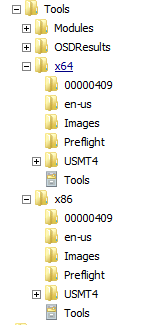
From the v7 folder in the x86 or x64 folder, copy the file “Tools.cab” to the appropriate tools folder (either Tool\x86 or Tools\x64) in your MDT deployment share.
Enable DaRT Features in Windows PE
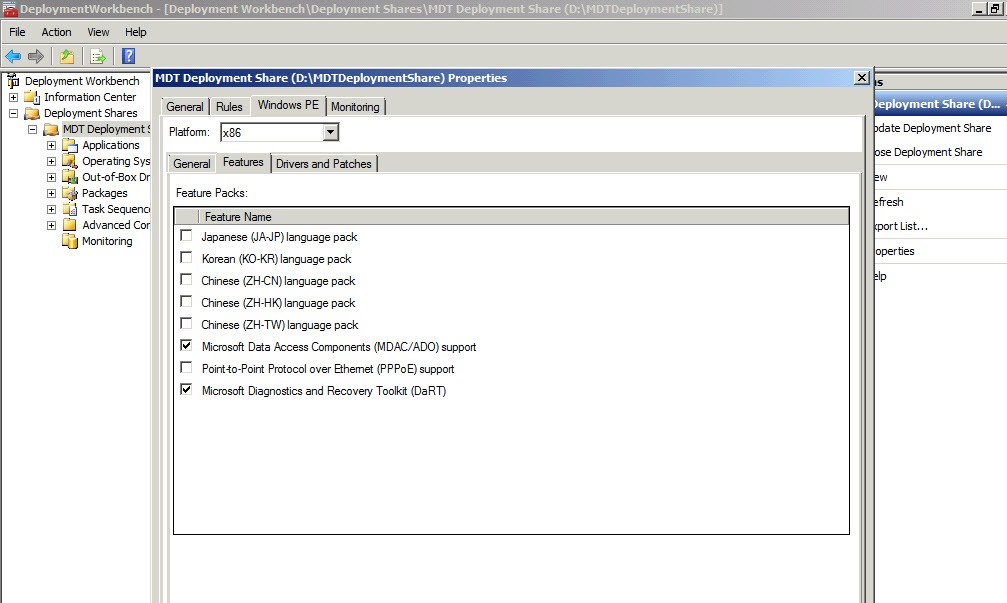
In the Deployment Workbench, go to the “Properties” for your deployment share. On the “Windows PE” tab select the “Features” tab for the x86 platform. You should now see Microsoft Diagnostics and Recovery Tools (DaRT) on the list of available features. Check the selection box beside that feature to enable it in Windows PE. Do the same for the x64 platform.
 .
.
Once you have enabled Microsoft Diagnostics and Recovery Toolkit (DaRT) on the properties page for Windows PE, you will need to update your Windows PE images by right clicking the deployment share and selecting “Update Deployment Share”
That’s it, your Windows PE images have now been updated and the DaRT tools will be available during your Windows build process.
Don’t forget that if you want to be able to monitor deployments from the MDT console, you must enable monitoring. That is also done in the properties of the deployment share, on the “Monitoring” tab.
What about Configuration Manager?
Being a Configuration Manager guy, my first question of course was “can I do this in Configuration Manager? The answer, according to Michael Niehaus is “sort of” You can read his explanation on his blog at ttp://blogs.technet.com/b/mniehaus/archive/2011/11/28/mdt-2012-new-feature-dart-integration.aspx.
 About Douglas Griffin
 Yet Another System Center Blog